
Motion analysis
About 600 tracked points per frame, checked forward and backward. One arrow too long gives it away.
Stutter fix for AI video · Native Mac app
AI video can skip a moment of motion, even when the file is 24 fps. Frame Repair finds those jumps and rebuilds the missing in-between frames.
Slow motion, quarter speed
Missing motion in the original clip
The file says 24 frames per second. But the movement skips a step: the movement jumps too far between two different frames. That missing moment is already in the AI-generated source clip.
Converting from 24 to 25 fps is a different task. Frame Repair targets the jump itself and reconstructs the missing in-between motion. You can keep your output at 24 fps.
The finding
That's why Frame Repair can find it.
One click
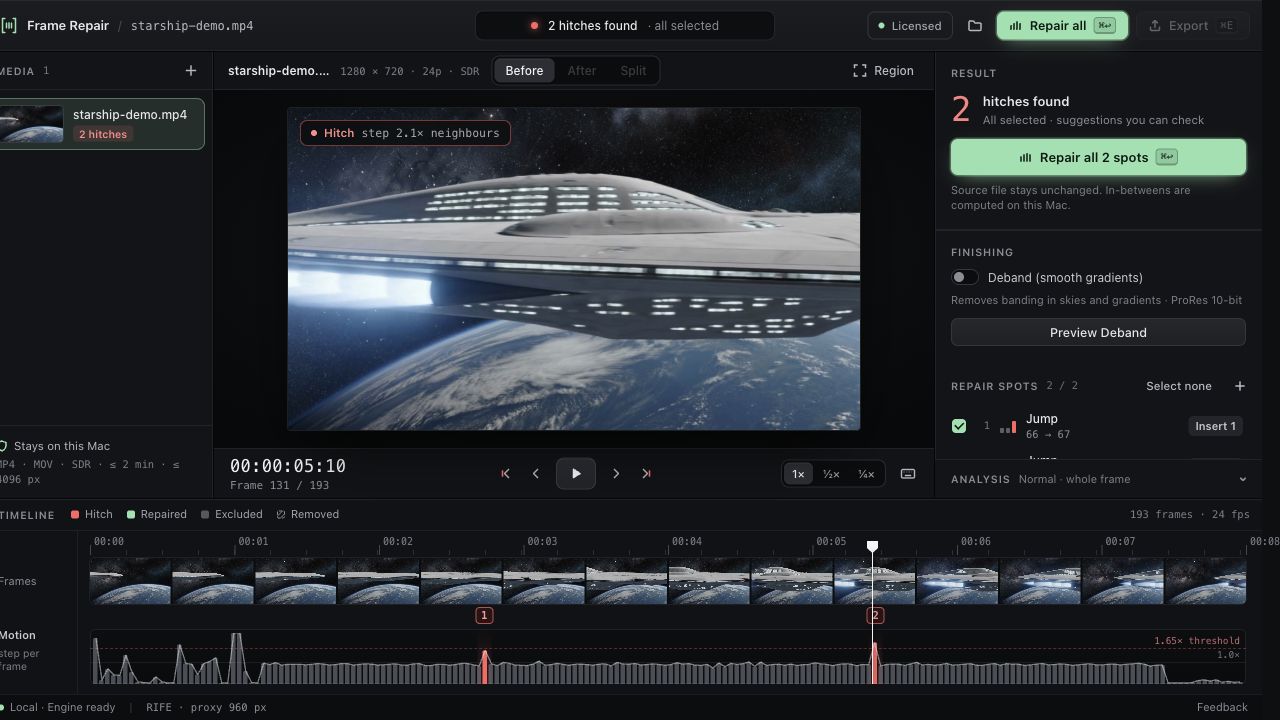
Analysis starts on its own
Every hitch pre-selected
ProRes 422 or H.264
Everything stays on your Mac. No upload, no account.
Under the hood
About 600 tracked points per frame, checked forward and backward. One arrow too long gives it away.
RIFE 4.6 computes the missing in-between frame on your Mac's GPU.
Re-decoded and checked for frame count, size and frame rate. A repair log comes with it.
Examples
Drag the divider. Both clips run in sync.
Container ship (hero): 2.2× → 1.4×. After repair, analysis finds no hitch.
Three ways to repair
Adds a computed frame. Slightly longer shot.
Rebuilds a frozen frame. Same length.
Removes a duplicate. Slightly shorter shot.
Export option
Banding shows up the moment you grade. Deband removes it before it gets there.

measured on our test clips
Requirements
Honest limits
Pricing
Frame Repair for Mac
€49
one-time
3 free watermarked exports · then €49 one-time
One-time purchase. Taxes shown at checkout.
FAQ
No. A generated clip can already have a sudden jump between different frames in its original 24 fps sequence. The frame rate is correct, but a step in the movement is missing. Frame Repair detects those spots and reconstructs the in-between motion. Choosing 24 or 25 fps for export is a separate decision.
No. It targets one problem: a sudden jump in the movement between frames. It does not repair every kind of temporal artifact. You review every repair before export. How to tell which problem your clip has →
No. Analysis, interpolation and export run on your Mac. Nothing is uploaded to repair a clip. Only the one-time license activation goes online, and no video or image data is part of it.
It is not tied to a model. Clips from Seedance 2.5, LTX, Kling, Veo or Runway load like any other MP4 or MOV within the limits. Our testing so far used Seedance 2.0, so start with a short clip. Step by step: fix stuttering AI video →
Insert adds computed frames (slightly longer). Replace rebuilds one frame (same length). Drop removes duplicates (slightly shorter). All three are included in your license. Frame interpolation for AI clips, explained →
An export switch for ProRes 10-bit. It removes the visible steps (banding) in skies and gradients without blurring edges. In our measurements the banded area in a sky dropped from 0.53 to 0.10, and edge sharpness changed by only −0.3 to −1.7 %. It is included in your license.
These are output options for your editing timeline. The repair addresses missing in-between motion already in the source clip, whichever output rate you choose. Inserted frames can change the running time, and you see that before you export.
Frame Repair works on picture only. Keep the sound in your editor and lay the repaired clip over it.
Yes, your exports are yours. The license is a single-user license: activate it on up to 2 of your own Macs.
Yes. Download the free trial: 3 watermarked exports. Then decide.
After you buy, Lemon Squeezy emails you the license key. In Frame Repair choose "Enter license key" and paste it. Activation needs an internet connection once.
Write to us, ideally with a short sample. You also have 14 days to get your money back, no questions asked.

3 free watermarked exports. Then €49 one-time.
Download free trialmacOS 14+, Apple Silicon